Law firms need to exchange sensitive documents with clients, counsel and other parties throughout a matter. Clients often send files through the tools they already use, including Google Drive, Dropbox and WhatsApp. The risk increases when staff reply through those same channels with legal advice, draft agreements or evidence. Copies can end up in accounts and folders the firm cannot manage. Similar risks arise when staff use personal email to meet a deadline, upload a document to an AI tool, or keep working copies outside the document management system (DMS).
Publicly documented incidents show why it matters to know where client information is held and to have a record of how it moved.
- HWL Ebsworth, Australia, 2023. The ransomware incident exposed information held by the firm. The Australian Government’s review reported that 62 Australian Government entities were affected, alongside state and territory agencies and private-sector clients. The Fair Work Ombudsman confirmed that documents relating to some of its files were included in the breach. homeaffairs.gov.au
- DPP Law, United Kingdom, 2022. A cyberattack led to highly sensitive and confidential personal information being published on the dark web. The UK Information Commissioner’s Office fined the firm £60,000 in 2025. ico.org.uk
- Le & Associates, United States, 2012. The Washington Court of Appeals described two departing lawyers downloading and printing client files, then using the information to solicit business in breach of their separation agreement.
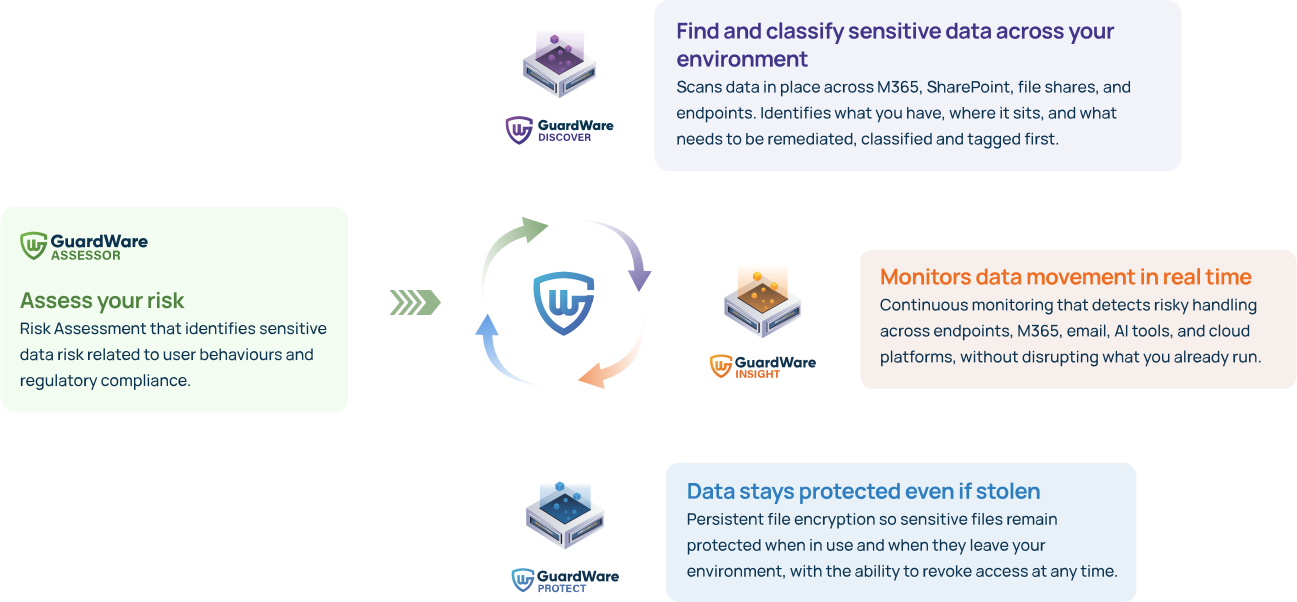
GuardWare starts with INSIGHT to help firms see how sensitive information moves across monitored channels while keeping everyday client collaboration open. DISCOVER then helps firms find and classify sensitive information in the systems and devices where working copies accumulate.
10 use cases for law firms
# | Client data risk | How GuardWare helps |
1 | Confidential advice sent back through a client’s preferred channel. A client shares documents through Google Drive, Dropbox or WhatsApp. A staff member uses the same channel to return legal advice or a marked-up agreement, leaving a copy in a location the firm may have limited control over. | INSIGHT monitors outbound file transfers on supported channels and devices. The firm can keep client intake open while reviewing what staff send back. |
2 | Matter files copied to personal accounts. A lawyer forwards a bundle to personal email or uploads it to personal cloud storage to finish work from home. The copy sits outside the firm’s access, retention and offboarding controls. | INSIGHT can flag transfers to supported personal email and cloud services for review. |
3 | A deadline-driven workaround becomes routine. A paralegal sends an oversized bundle through an unapproved file-sharing service. The shortcut works and is repeated on other matters. | INSIGHT can send a “Speeding Ticket” that explains which activity triggered the alert and points staff to the firm’s approved method for sharing large files. |
4 | Client information disclosed in AI prompts. A junior lawyer or paralegal pastes part of a witness statement or draft settlement into an AI tool for a quick summary. | INSIGHT can detect sensitive content in prompts on supported AI tools, including matter details entered directly as text. |
5 | Sensitive information in scans uploaded to AI. An administrator uploads a scanned passport, medical report or signed form to extract text. A generic filename gives little indication of what the document contains. | INSIGHT can use optical character recognition (OCR) to detect sensitive information within supported images and scanned documents. |
6 | Unusual file transfers before a departure. A departing partner or employee with routine access copies matter files, client lists or firm precedents to USB, personal email or cloud storage. | INSIGHT can flag bulk or high-risk transfers across monitored channels, giving the firm specific events to investigate during offboarding. |
7 | An evidence gap when a client follows a departing partner. The firm suspects confidential information was taken and needs to establish what happened before the departure. | INSIGHT can provide a timeline showing the user account, files, time and destination where captured. The firm can compare those events with DMS logs and offboarding records. Establishing how information was later used requires further evidence. |
8 | Client data scattered outside the official matter file. The DMS holds the matter record, while attachments, working drafts and downloads remain in Outlook, SharePoint, OneDrive, file shares and local devices. | DISCOVER scans supported locations to help the firm identify where else it holds sensitive client information. |
9 | Sensitive files go unrecognised and unlabelled. Identity documents, bank details and medical reports sit in shared folders under generic names. Staff may share them without realising what they contain. | DISCOVER identifies configured sensitive data types and can apply the firm’s Microsoft Purview labels to supported files. |
10 | Client records remain accessible after a matter closes. Copies of evidence, correspondence and identity documents remain in mailboxes, folders and downloads after the official file is closed. | DISCOVER helps matter owners locate those copies and decide which to file, retain or remove under the firm’s retention policy and any applicable legal hold. |
To talk to GuardWare about a data discovery exercise or the GuardWare Assessor offer,
Related Use Cases
Client data risks in law firms
The Outsourcers Answer: TCS and HCLTech Confront a Hacker’s Claims
Eight Agents, Four Days: AI Runs a Government Intrusion in Taiwan
Closer to Home: Origin Energy’s Breach Traced to a Manila Call Centre